Give Search Upside access to your Google Business Profile
For Search Upside to manage your Google Business Profile and reply to reviews, we need Manager access. Setting this up should just take a few minutes.
Add this email as a Manager assistant@searchupside.com
Before you start
- Use a computer. Google's phone apps show these menus differently.
- Only an Owner of the profile can add people. If you're not sure who that is, it's probably the person who set up the business profile.
Steps
- Sign in to the Google account that owns the profile and search Google for your business name. Your profile's Your business on Google panel appears at the top.
-
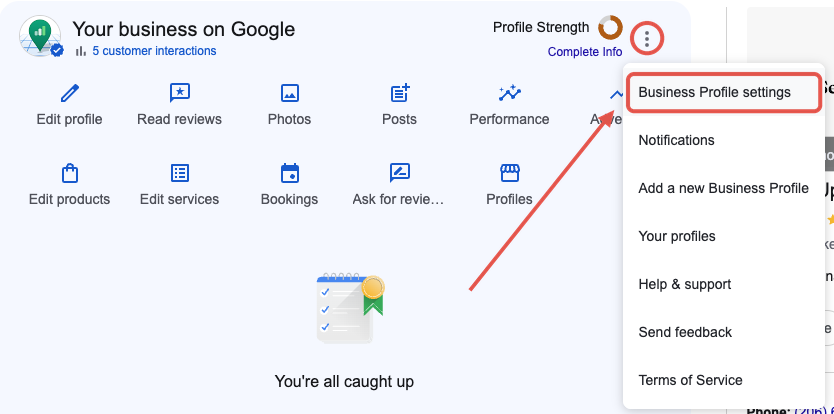
Select the three dots (⋮) at the top right of that panel, then Business Profile settings.
-
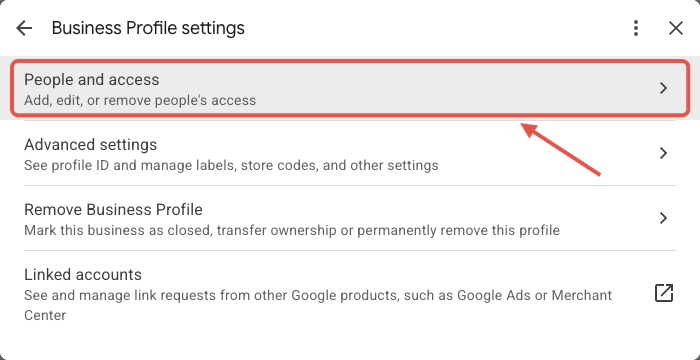
Select People and access.
-
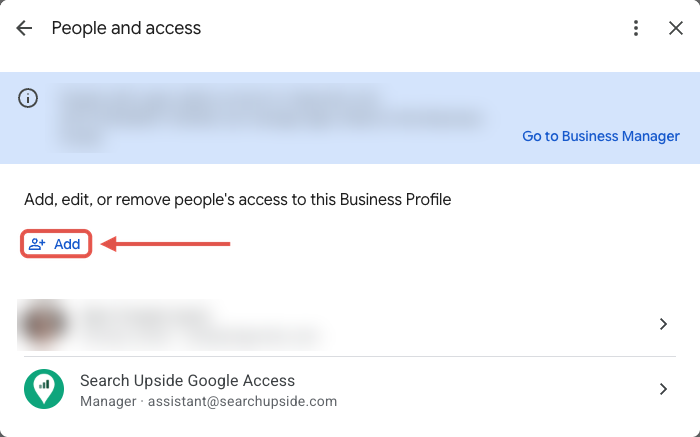
Select Add and enter assistant@searchupside.com.
-
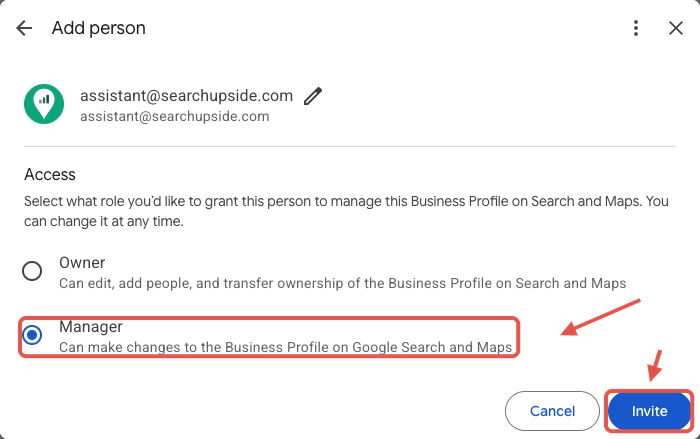
Under Access, choose Manager, then select Invite.
After you invite us
- We accept the invite and let you know. Your dashboard then shows Manager access: Connected.
- Have more than one location? Repeat the steps for each profile.
What Manager access allows
A Manager can reply to reviews and update your business information. A Manager can't remove you, delete the profile, or take over ownership. You can remove our access at any time under People and access.
Stuck? Email support@searchupside.com.