Completing Google Business Profile Video Verification If You Are a Service Area Business
How a Marysville landscaper finally switched their Google Business Profile from storefront to Service Area Business: three video verification takes, what failed, what passed, and what we'd do first next time.
I just got to work with a SAB (Service Area Business) client and here was our experience and takeaways.
Result: Successfully transitioned their GBP from Storefront (which was incorrect) to SAB
tl;dr
- It took us three takes
- We did need to purchase branded magnets for the vehicles (Fastsigns)
- We did need to closely review the video to make sure it was really viewable (close enough, focused enough)
- We did need to strictly follow all rules (no faces, no bank accounts, don’t go over 5 minutes)
- If you are on Android ensure Precise location is enabled for your Google app
Situation
Universal Landscape Corp is a landscaper in Marysville WA (35 miles north of Seattle on I-5 corridor). Their GBP was stuck as a Storefront (listing their address) even though they really are a SAB.
(Nobody brings their landscaping projects to them 😉)
They actually wanted to switch to SAB years ago and tried but because the verification was so challenging they gave up and just left their GBP as storefront. This was fine if they never touched their GBP but in order to take control of the Local SEO we were going to need to get them correctly verified as a SAB.
Their business was on a private driveway at the very back, so we were unable to just use the house itself as a landmark. We had to start from a remote landmark and then drive to the residence.
First Attempt - FAIL
Our first attempt we used the street signs for the intersection that was 1/4 mile to the east.
- Starting Point: 1/4 mile east, probably too far away from the signs though it felt ok when filming
- Unlock Branded Vehicle: No
- Android Precise Location Enabled: No
- Documentation: Sales slips w/ company address, vehicle registrations
- Video Duration: 4:20
Second Attempt - FAIL
- Starting Point: a couple businesses and cross streets 1/4 mile east
- Unlock Branded Vehicle: Yes
- Android Precise Location Enabled: No
- Documentation: WA business license, WA contractor license, QuickBooks interface on iPhone
- Video Duration: 5:10
Third Attempt - SUCCESS
- Starting Point: cross street 1/8 mile west, less busy. Video was very close to guarantee signs being visible. Held for total of 8 sec.
- Unlock Branded Vehicle: Yes
- Android Precise Location Enabled: Yes
- Documentation: WA business license, WA contractor license
- Video Duration: 3:50
The feedback from Google
With each verification failure we would get this same response from Google.
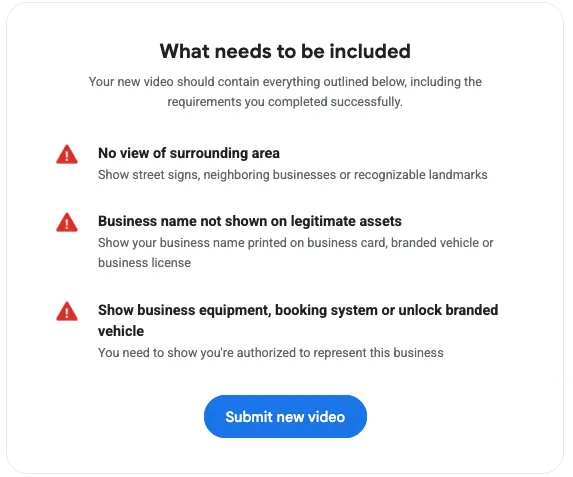
We could not determine if these were hard and specific failures or if they were generic. They felt generic.
Alternative Ways to get Verified
After the second failure I scoured the internet to see if you could get a manual route. It really felt like we were doing it correctly. In short: there is no other way. Manual paths that used to work have been shuttered. Google help and support process all funnel you to a final check where if your GBP is not verified then you get zero support. The only path we could see was to keep trying.
Key recommendations
- DO watch the movie after each take and do redo it if any of the critical parts have any video or audio issues. We were in a rush for the first two and I think we didn’t appreciate how very degraded the Google app makes the video. If you are trying to show a sign, you literally need to be standing on top of it. Pick the starting location that will allow you to do this.
- Also our final and successful attempt proved that street signs are adequate (businesses or other landmarks are not required).
- If you are on Android ensure Precise location is enabled for your Google app
- If a vehicle is your proof of ownership then you will likely need it to be branded
- Use your state business license as your documentation proof point. I don’t believe that was called out clearly beforehand and it was only after we got our first rejection from Google that we realized we needed to use that.
Stuck on verification?
If your Google Business Profile is stuck in verification, or listed as a storefront when you really go to your customers, I can help. Getting a profile verified and set up correctly is the first step to showing up in Google, Google Maps, and AI answers.